

Blog
Crypto order-book terminals: what each is good for
Best crypto order-book terminals compared: Bookmap, ATAS, CScalp, Exocharts and HookScreener. What each one does, checked against vendor documentation.
There is no single best order-book terminal. An article that names one is describing somebody's workflow, not the market.
These products differ along two axes: how much depth they give you on one market versus how much breadth across many, and whether they can execute or only analyse. Bookmap and ATAS are strong on depth and analysis. CScalp is depth and execution. HookScreener, which we build, is breadth and filtering.
Below is a comparison of five tools at different points on those axes. Every platform, feature and price claim is checked against the vendor's own site; where their documentation contradicts itself, we say so rather than pick the convenient figure.
The short answer
- Bookmap — watching liquidity change over time
- ATAS — deep order-flow and footprint analysis
- CScalp — free manual scalping from the ladder
- Exocharts — crypto-native order flow with a browser option
- HookScreener — working out which market to open before you open any of the above
Most people who take this seriously use two tools, not one.
Comparison
| Tool | Order-book heatmap | DOM | Footprint / volume | Alerts | Cross-market scanning | Web access | Can execute |
|---|---|---|---|---|---|---|---|
| Bookmap | Yes — historical LOB | Yes | Yes | Unverified | Aggregates up to 5 exchanges, one instrument | Yes — Bookmap Web | Yes, not from Multibook |
| ATAS | Yes — real-time liquidity | Yes | Yes — 400+ footprint variants | Yes | Cluster Search; market-wide screener unverified | Prototype only | Yes |
| CScalp | Unverified | Yes — up to 40 books | Clusters; volume profile unverified | Unverified | Separate free screener product | No | Yes |
| Exocharts | Unverified | Yes — L2/L3 | Yes — footprint + TPO | Unverified | Not the primary focus | Yes — limited tier | No — stated as in progress |
| HookScreener | No | Yes — ladder | Clusters only | Yes — 4 detector types | Yes — ~7,400 symbols, 16 venues | Yes — browser only | In testing |
"Unverified" means the vendor's own pages did not confirm it, not that the feature is absent. "Not the primary focus" means the tool requires you to choose a market first.
What counts as an order-book terminal
The category gets muddled in listicles, so a quick clear-out.
- Coinalyze — a crypto futures data dashboard (open interest, funding, liquidations). We found no order-book functionality.
- Coinglass — a derivatives and liquidation dashboard with an API. It shows order-book depth, but there is no DOM ladder and no footprint.
- Velo — a data terminal with orderbook heatmaps that can route trades to Bybit and Hyperliquid. Its centre of gravity is derivatives data.
- Aggr.trade — a free, open-source aggregator of the trade tape. That is executed trades, not the limit order book.
A note on the word "heatmap" — vendors use it in three unrelated senses. An order-book heatmap shows resting limit orders over time (Bookmap describes theirs as "the historical limit order book"). A liquidation heatmap estimates forced-close levels, a derivatives concept. And Quantower's "Market Heatmap" ranks assets by percentage change. Three different things, one word.
How we compared
Every claim about a competitor comes from that vendor's website or documentation, linked at the end. Where two official pages disagree, we cite neither and flag the contradiction.
We did not measure execution latency — that needs identical hardware and colocation. We deliberately do not rank rendering performance, support, or "which is best": none is measurable from outside.
Bookmap
What it is. A platform that lets you, in their words, "visualize market liquidity and gain incredible insight into the order book."
Main strength. The heatmap. A standard depth view shows the book now; Bookmap's plots the historical limit order book with time on the horizontal axis, so you can watch a wall get built, sit, and vanish. Also confirmed: footprint, volume profile, CVD, an imbalance indicator, iceberg detection and a liquidation indicator. Multibook merges up to five exchange books into one — aggregation of a single instrument, not a scanner across many.
Who it's for. Traders working out how a specific level was defended.
Limitation. Trading works on single-instrument charts but, per their own FAQ, not from Multibook. The learning curve is real. Stock and futures market data is billed separately.
Availability. Desktop plus Bookmap Web, officially a browser-based platform with the same tools. We could not verify the OS matrix — their platforms page 404s. Two official pages gave different prices for the same tier, so we quote no price.
Category. Analytical platform with execution.
ATAS
What it is. "Order Flow & Volume Analysis Software for Professional Traders," their phrasing.
Main strength. Analytical depth: 400+ footprint variations, 70+ volume-analysis tools, Smart DOM and DOM Trader, a Smart Tape, a real-time liquidity heatmap, and Cluster Search for patterns in bid/ask/delta.
Who it's for. Traders who decompose order flow — whether buyers lifted offers or sellers hit bids.
Limitation. Futures-and-equities first. Their pages contradict each other on crypto: the homepage claims 25+ exchanges, the crypto page says 8 connections. We use the latter. Cluster Search is pattern search, not a market-wide scanner.
Availability. Windows; ATAS X (Beta) adds a native macOS build. Classic ATAS on Mac runs under Parallels. "ATAS Web" is referenced as a prototype. The crypto START tier is free; paid plans from €24.95/month.
Category. Professional analytical platform with execution.
CScalp
What it is. A "FREE TRADING TERMINAL" for intraday trading.
Main strength. A fast ladder with well-designed hotkeys, one-click orders and position close, SL/TP, multi-account trading across exchanges, up to 40 books at once. Fully free, including updates and support.
Who it's for. Anyone learning ladder mechanics or scalping manually without a budget.
Limitation. Windows x64 only — per their FAQ, Mac and Linux need an emulator. It shows the book rather than analysing it: clusters exist, but we could not verify a heatmap, volume profile or alerts on their official pages. Their homepage and FAQ list different exchange sets. Competitor comparisons published on their own domain are marketing, not neutral fact.
Availability. Windows desktop only.
Category. Execution-focused terminal. Their free crypto screener is a separate product.
Exocharts
What it is. "The #1 crypto charting platform," running on desktop and web.
Main strength. Crypto-native order flow: footprint, customisable TPO profiles with a volume-profile overlay, DOM and tape with Level 2/3, VWAP, liquidations, bid-ask imbalance. Up to six years of tick data.
Who it's for. Crypto traders who want footprint analysis without being tied to Windows.
Limitation, and a significant one. It cannot place orders — their FAQ: "the Trading feature is not available… we are actively working on its integration." The web tier is deliberately the lesser product: "simple and fast with pre-configured candle types," while Desktop Pro is "much more capable." A heatmap is implied on their homepage but absent from their features page — we treat it as unverified.
Availability. Desktop Pro on Windows and macOS plus a separate web tier. Desktop Pro €49/month, Web Premium €28/month, VAT extra.
Category. Analysis-only order-flow platform.
HookScreener
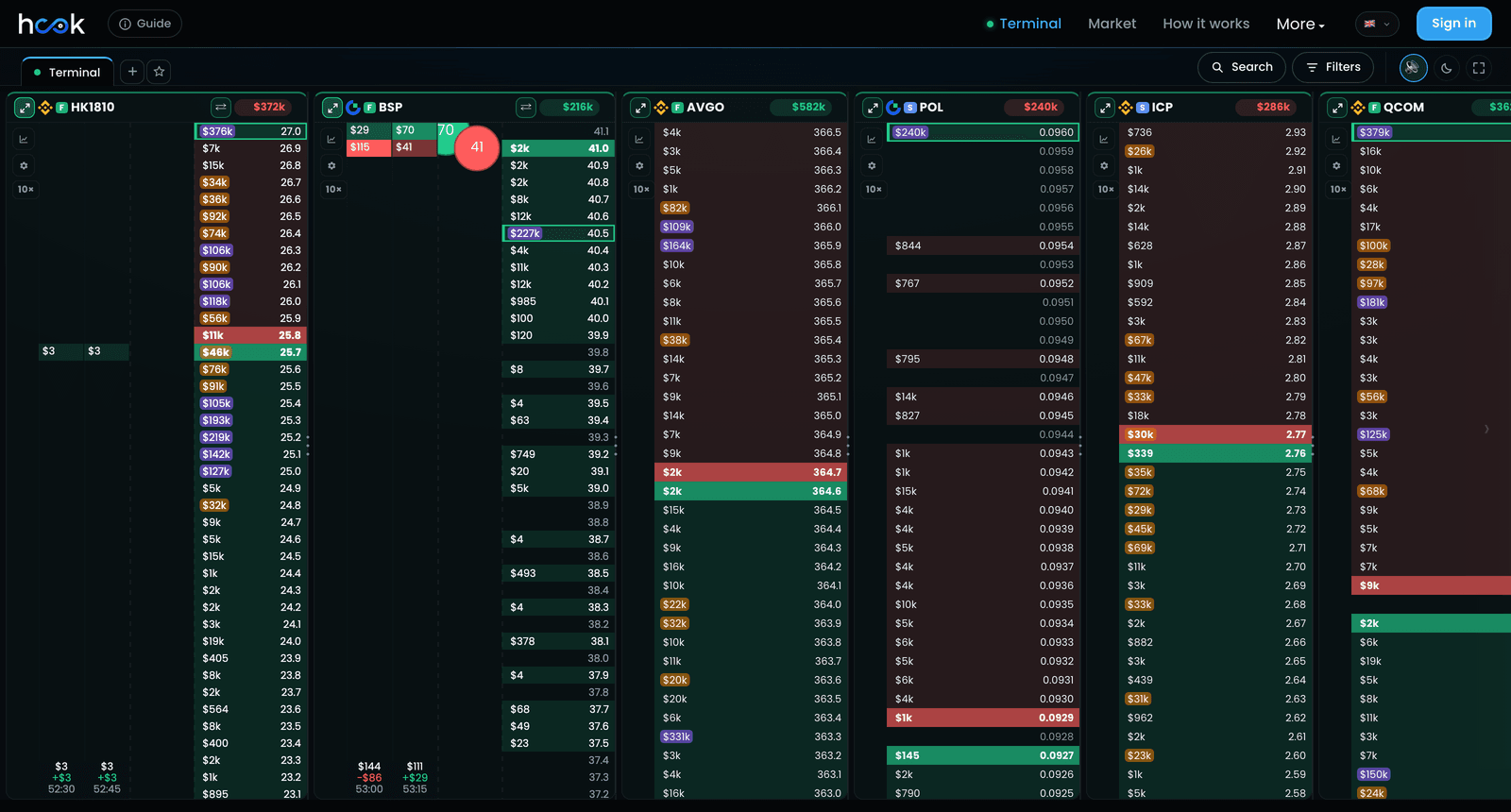
This is our product — treat the framing as ours, and read the limitations.
What it is. A browser-based terminal streaming order books from 16 spot and futures venues directly to the browser, with four detectors across roughly 7,400 symbols: liquidity walls, algorithmic flow, sweeps and pushing.
Main strength — and the actual difference. The other terminals help you analyse a market you have already chosen. This one helps you work out which market deserves attention in the first place. The point is not that we read one book better — we read it worse. The point is that nobody can watch 7,400 books, and most of what a detector finds does not deserve showing: measured over three days, roughly 100 detections discarded per one published.
Who it's for. Deciding which market to open in your other tool.
Limitations, plainly:
- No heatmap. Bookmap's and ATAS's defining feature.
- Clusters exist, but this is not an ATAS-class analysis suite.
- Order placement is in testing, not shipped. CScalp, ATAS and Bookmap execute today.
- Coverage is 16 venues and ~7,400 symbols — not every market that exists.
- A detection is not a trade signal. We published measurements showing a wall's side barely predicts direction.
Availability. Any browser, any OS, no install. Free, no card.
Category. Discovery and filtering layer — not a replacement for the four above.
Which one for which job
- Historical liquidity → Bookmap
- Deep order flow → ATAS
- Free manual scalping on Windows → CScalp
- Crypto order flow on Mac or in a browser → Exocharts
- Don't know which market to watch → HookScreener
- One tool for everything → doesn't exist; the honest answer is two
Why discovery and analysis are different problems
Watching one book and watching thousands are different engineering problems.
Rendering one book well means holding one connection and drawing fast. Watching several thousand means holding hundreds of connections, keeping a live model of every book, running detection continuously, and then deciding what is worth mentioning. Most of the difficulty lives in that last part, and it is invisible until you build it.
Which is why "just add a scanner" is not a small feature request for a visualisation tool, and why a discovery layer that also tried to be Bookmap would be worse at both.
Cross-platform and mobile
Most of this category grew up on Windows: CScalp is Windows-only, and Quantower states the same officially. Bookmap Web, Exocharts' web tier, ATAS X's macOS build and browser-based tools are the counterweight. Mac users are not stranded, but the deepest desktop tools still lean Windows.
On mobile, carefully. Heatmaps and footprint grids need pixels a phone does not have — for browsing thousands of markets, a mobile order-book terminal genuinely is impractical. The constraint changes when the number of books drops from thousands to a handful: reading three filtered events on a phone is a workable task.
Our own status plainly: mobile improvements have shipped and been verified on a real device, a dedicated layout is in development, and we are giving no date. Today, no tool here fully solves mobile order-book analysis.
Conclusion
These five do not compete for the same job, so ranking them would be the wrong exercise.
Bookmap and ATAS are depth and analysis, and better at it than a discovery layer will ever be. CScalp is depth and execution, free, Windows-bound. Exocharts is crypto-native analysis without execution. We are breadth and filtering, with no heatmap and no shipped order entry.
What they share: they help you observe a market. None decides for you, and none — ours included — turns a detection into a forecast. Choose by which part of your workflow is actually the bottleneck.
FAQ
Which crypto order-book terminal is best? There isn't one. Bookmap leads on historical liquidity visualisation, ATAS on order-flow depth, CScalp on free manual ladder trading, Exocharts on crypto-native analysis, HookScreener on cross-market discovery.
Can I use these together? Yes, and most serious users do: a discovery tool decides where to look, a depth tool studies and executes.
Do any run natively on a Mac? Exocharts Desktop Pro supports Windows and macOS, ATAS X (Beta) has a macOS build, and Bookmap Web plus browser-based tools sidestep the question. CScalp needs an emulator.
Is there a free option? CScalp is fully free. ATAS has a free crypto START tier, Bookmap a free Digital tier with free crypto connections, Exocharts a limited trial. HookScreener is free with no card.
Which can actually place orders? Bookmap, ATAS and CScalp today. Exocharts states trading is in progress. HookScreener's is in testing, not shipped.
Do order-book walls predict price direction? Our measurements say not reliably: across 2,146 large walls, the side a wall sat on made under a percentage point of difference to where price was an hour later. Details in that study.
Sources
Every competitor claim above traces to one of these official pages.
| Source | What it confirms |
|---|---|
| bookmap.com/crypto | Heatmap as historical limit order book, footprint, volume profile, CVD, iceberg detection, Multibook across 5 exchanges |
| Bookmap crypto FAQ | Trading available on single-instrument charts, not from Multibook |
| atas.net/atas-crypto | Crypto connection count, real-time liquidity heatmap, Smart DOM, 400+ footprint variations, Cluster Search |
| ATAS X | Native macOS build (beta) |
| ATAS tariff plans | Free crypto START tier; paid from €24.95/month |
| fsr-develop.com | CScalp fully free, dynamic DOM, clusters, one-click orders, Windows x64 only |
| CScalp FAQ | Mac and Linux require a Windows emulator |
| Exocharts FAQ | Desktop on Windows and macOS plus Web; trading not available, integration in progress |
| Exocharts features | Footprint, TPO profiles, DOM and tape with L2/L3 |
| Exocharts pricing | Desktop Pro €49/month, Web Premium €28/month, VAT extra |
| Quantower FAQ | Windows only, no web version |
| coinalyze.net | Futures data platform — open interest, funding, liquidations; TradingView charts |
| coinglass.com | Liquidity & order depth and liquidation heatmaps listed as separate products |
| Velo docs | Data terminal; orderbook and liquidation heatmaps as distinct features; trading on Bybit and Hyperliquid |
| AGGR repository | Trade-tape aggregator, browser-based, cannot place orders, GPL-3.0 |
Deliberately not cited: Bookmap's pricing (two official pages gave different figures for the same tier), ATAS's homepage crypto count (contradicts their crypto page), and TradingLite — a browser-based crypto heatmap tool we had intended to include, whose homepage now reads "Technology available for acquisition" with pricing and documentation pages returning 404. We excluded it rather than describe a product whose availability we cannot confirm.
Prices, platforms and features were checked against vendor documentation in September 2026. This category moves; verify before buying, especially where we have flagged a vendor's own pages as contradictory.